ColorScripts-Enhanced PowerShell Module
Credits: This project owes its existence to the foundational work of two developers. The ANSI art scripts were originally created and/or collected by Derek Taylor (DistroTube) in shell-color-scripts, then ported to PowerShell by Scott McKendry as ps-color-scripts.
ColorScripts-Enhancedbuilds on their work with selective output caching for expensive renderers, cross-platform support, an expanded command set, and a formal module structure.













A cross-platform PowerShell module for discovering and displaying ANSI colorscripts, with selective output caching for renderers that are expensive to regenerate.
✨ Features
-
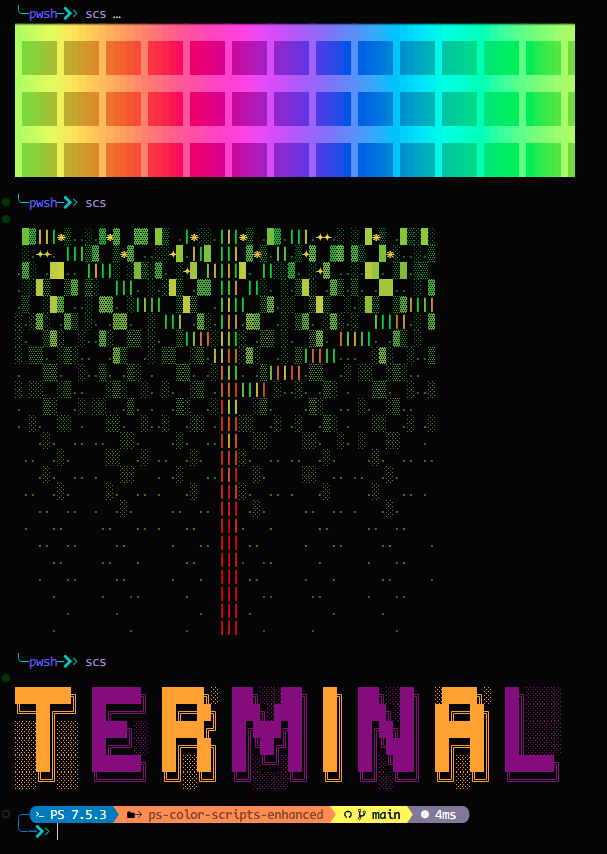
🎨 24822+ Colorscripts — Fractals, patterns, characters, nature scenes, and more
-
⚡ Selective Caching — Reuses output for the 15 computational renderers listed in
CachePolicy.psd1; deterministic bundled scripts render in-process -
🌐 Cross-Platform — Works on Windows, macOS, and Linux
-
⚙️ Configurable — Persist cache location, startup behavior, and defaults
-
Rich Metadata — Filter the catalog by name, category, and tag or export it as structured data
-
🐾 Thousands of Pokémon ColorScripts — Pokémon and shiny-Pokémon collections participate in normal selection
To opt out, use
-ExcludeCategory Pokemon,ShinyPokemonwithShow-ColorScript. -
🌍 10 Languages — English, German, Spanish, French, Italian, Japanese, Dutch, Portuguese, Russian, Chinese
-
🧩 Easy to Use — Simple commands with tab completion
-
🗄️ Platform-Aware Cache — Query
(Get-ColorScriptConfiguration).Cache.EffectivePathfor the user-scoped location -
🔄 Auto-Update — Cache invalidates automatically when scripts change
-
📚 Localized External Help — Markdown and generated MAML topics for all 10 public commands in 10 cultures
🚀 Quick Start
# Install from PowerShell Gallery
Install-Module -Name ColorScripts-Enhanced -Scope CurrentUser

# Import and display a random colorscript
Import-Module ColorScripts-Enhanced
Show-ColorScript

# Add to your profile (optional - shows colorscript on every terminal open)
Add-ColorScriptProfile
Requires PowerShell 5.1+. PowerShell 7+ recommended for best performance.
📖 Basic Usage
# Show a random colorscript
Show-ColorScript
scs                          # shorthand alias

# Show a specific colorscript
Show-ColorScript -Name "mandelbrot-zoom"
scs pikachu

# Show the selected script name and full path after rendering
Show-ColorScript -ShowInfo

# List all available colorscripts
Show-ColorScript -List
Get-ColorScriptList

# Filter by category
Get-ColorScriptList -Category Patterns
Get-ColorScriptList -Tag Recommended

# Exclude Pokémon scripts when desired
Show-ColorScript -ExcludeCategory Pokemon,ShinyPokemon
⚡ Boost Performance with Caching
# Build caches only for computationally expensive renderers
New-ColorScriptCache

# Rebuild cache if scripts seem stale
New-ColorScriptCache -Force

# Inspect scripts skipped because caching is unnecessary
New-ColorScriptCache -Name bars -PassThru

# Clear cache if needed
Clear-ColorScriptCache -All
🎨 Examples
Add a colorscript to your terminal startup:
# Option 1: Use the built-in helper
Add-ColorScriptProfile

# Option 2: Manually edit your profile
notepad $PROFILE
# Add these lines:
Import-Module ColorScripts-Enhanced
Show-ColorScript

# Option 3: Import the module without startup art
Add-ColorScriptProfile -SkipStartupScript
Pokémon participate by default:
- Random, list, all-script, cache, and profile-startup behavior use the normal script and cache policies without a Pokémon-specific filter.
- Opt out of Pokémon display selection with
Show-ColorScript -ExcludeCategory Pokemon,ShinyPokemon. -IncludePokemon,-SkipPokemonPrompt, and-PokemonPromptResponseremain silent, deprecated no-op compatibility parameters for one release. New managed profiles never prompt about Pokémon or emit-IncludePokemon.
Create a custom alias:
Set-Alias -Name cs -Value Show-ColorScript
🔧 Commands Reference
| Command | Alias | Description |
|---|---|---|
Show-ColorScript |
scs |
Render, list, or browse colorscripts |
Get-ColorScriptList |
— | Query colorscript inventory records |
New-ColorScriptCache |
Update-ColorScriptCache, Build-ColorScriptCache |
Build policy-selected cache entries |
Clear-ColorScriptCache |
— | Remove selected cache entries |
Add-ColorScriptProfile |
— | Add a managed module profile block |
Get-ColorScriptConfiguration |
— | Read effective configuration |
Set-ColorScriptConfiguration |
— | Persist cache and startup preferences |
Reset-ColorScriptConfiguration |
— | Restore built-in configuration defaults |
Export-ColorScriptMetadata |
— | Return metadata objects or write JSON |
New-ColorScript |
— | Scaffold a UTF-8 colorscript file |
Get help for any command:
Get-Help Show-ColorScript -Examples
🔤 Nerd Font Support
Some colorscripts use special glyphs that require a Nerd Font. If you see boxes instead of icons:
- Download a Nerd Font (e.g., CascadiaCode, FiraCode, JetBrainsMono)
- Install the font and set it as your terminal font
- Test with:
Show-ColorScript -Name nerd-font-test
🐛 Troubleshooting
Colorscript not displaying correctly?
Show-ColorScript -Name "scriptname" -NoCache
Cache seems stale?
New-ColorScriptCache -Force
Module not found?
Get-Module ColorScripts-Enhanced -ListAvailable
📋 Requirements
- PowerShell: 5.1+ (7+ recommended)
- OS: Windows, macOS, or Linux on a PowerShell-supported platform
- Terminal: Any ANSI-capable terminal (Windows Terminal, VS Code, iTerm2, etc.)
📚 More Information
📖 User Documentation
- [Quick Reference Guide](/PS-Color-Scripts-Enhanced/docs/QUICK_REFERENCE.html) - [ANSI Color Guide](/PS-Color-Scripts-Enhanced/docs/ANSI-COLOR-GUIDE.html) - [Module Summary](/PS-Color-Scripts-Enhanced/docs/MODULE_SUMMARY.html) - [Changelog](/PS-Color-Scripts-Enhanced/CHANGELOG.html)🛠️ Developer Documentation
- [Development Guide](/PS-Color-Scripts-Enhanced/docs/DEVELOPMENT.html) - [Testing Guide](/PS-Color-Scripts-Enhanced/docs/TESTING.html) - [Linting Guide](/PS-Color-Scripts-Enhanced/docs/LINTING.html) - [npm Scripts Reference](/PS-Color-Scripts-Enhanced/docs/NPM_SCRIPTS.html) - [Publishing Guide](/PS-Color-Scripts-Enhanced/docs/PUBLISHING.html) - [Release Checklist](/PS-Color-Scripts-Enhanced/docs/RELEASE_CHECKLIST.html) - [ANSI Conversion Guide](/PS-Color-Scripts-Enhanced/docs/ANSI-CONVERSION-GUIDE.html)🤝 Contributing & Community
- [Contributing Guidelines](/PS-Color-Scripts-Enhanced/CONTRIBUTING.md) - [Code of Conduct](/PS-Color-Scripts-Enhanced/CODE_OF_CONDUCT.md) - [Security Policy](/PS-Color-Scripts-Enhanced/SECURITY.html) - [Support Policy](/PS-Color-Scripts-Enhanced/docs/SUPPORT.html) - [Project Roadmap](/PS-Color-Scripts-Enhanced/docs/ROADMAP.html)🔄 CI/CD & Quality
[](https://github.com/Nick2bad4u/ps-color-scripts-enhanced/actions/workflows/test.yml) [](https://codecov.io/gh/Nick2bad4u/PS-Color-Scripts-Enhanced) [](https://scorecard.dev/viewer/?uri=github.com/Nick2bad4u/PS-Color-Scripts-Enhanced) - [Test Workflow](.github/workflows/test.yml) - [Publish Workflow](.github/workflows/publish.yml)🙏 Credits
Built upon the work of:
- Derek Taylor (DistroTube) — Original shell-color-scripts
- Scott McKendry — PowerShell port
The collection incorporates art from upstream projects and reviewed archives, including shell-color-scripts, ps-color-scripts, Pokemon-Colorscripts, 16colo.rs, ArtScene, botany, os-ansi, and the Roy/SAC ANSI gallery. Those sources may contain work by individual artists whose terms differ from the archive or project that distributes it.
📄 License
Project-authored code is provided under the Unlicense. Third-party ANSI art and other incorporated works remain subject to their original authors’ rights and source terms; the repository license does not relicense those works. Files named 16c-*.ps1 use the documented artist-authorized, project-specific 16colors permission with required attribution, while roy-sac-*.ps1 remains under FAL-1.3.
Artwork Sources and Provenance
New curated imports are mapped in the repository-only ArtworkProvenance.psd1, with a compact artwork-details page, preserved evidence under ThirdPartyNotices, compact archive and content-curation checkpoints, and browsing/licensing context in the Artwork Sources guide. The large development records stay outside the published module; mapped scripts retain only an offline title/artist attribution and a script-scoped details link. This includes The Lake House by Zeus II of Mistigris, preserved as six contiguous, full-width scripts, and 126 unique Roy-authored works represented by 153 scripts under FAL-1.3. The exhaustive 1990-2026 16colors review is complete: 64,929 .ANS or .ICE candidates across 5,479 enumerated packs yielded 15,073 retained works and 21,495 scripts after post-import content, adult-policy, quality, source-continuity, promotional-content, and duplicate-render curation. Historical archive-recovery entries retain exact source evidence without inventing metadata that 16colors does not provide.
Enjoy the colors! 🌈✨
Contributors ✨

Thanks goes to these wonderful people (emoji key):
 Nick2bad4u 🐛 💻 📖 🤔 🚇 🚧 👀 ⚠️ 🔧 |
 Scott McKendry 🐛 💻 🎨 📖 💡 🚇 🚧 📦 🔌 👀 ✅ |
 Snyk bot 🛡️ 🚇 🚧 👀 |
 StepSecurity Bot 🛡️ 🚇 🚧 |
![dependabot[bot]](https://avatars.githubusercontent.com/in/29110?v=4?s=80) dependabot[bot] 🚇 🛡️ |
This project follows the all-contributors specification. Contributions of any kind welcome!