🚀 OhMyPosh Atomic Enhanced



This repository provides a custom theme configuration for Oh My Posh, a cross-platform prompt theming engine for shells like PowerShell, Bash, and Zsh. Inspired by the AtomicBit theme, this project aims to deliver a visually rich, highly informative, and developer-friendly prompt experience. It is designed for users who want a modern, customizable shell prompt with enhanced status indicators, dynamic segments, and consistent appearance across Windows, Linux, and macOS terminals.
Whether you’re a developer or power user, this theme helps you work faster and smarter by making your shell prompt more informative and visually appealing.
📑 Table of Contents
- How the OhMyPosh Custom Theme Works
- Key Features
- Oh-My-Posh Installation
- How to Use
- Advanced Customization
- Documentation
- Theme Styles
- Theme Gallery
🧩 How the OhMyPosh Custom Theme Works
See: General Configuration • Theme Files • Segment Docs (example: Git)
[NOTE] This theme is highly customizable–feel free to tweak colors and segments! 🚀
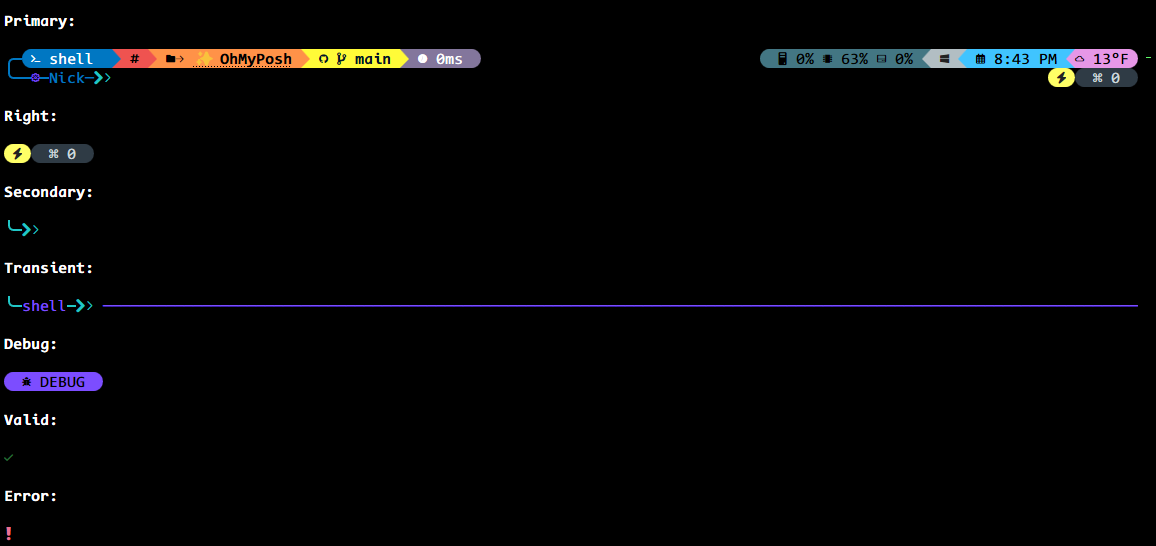
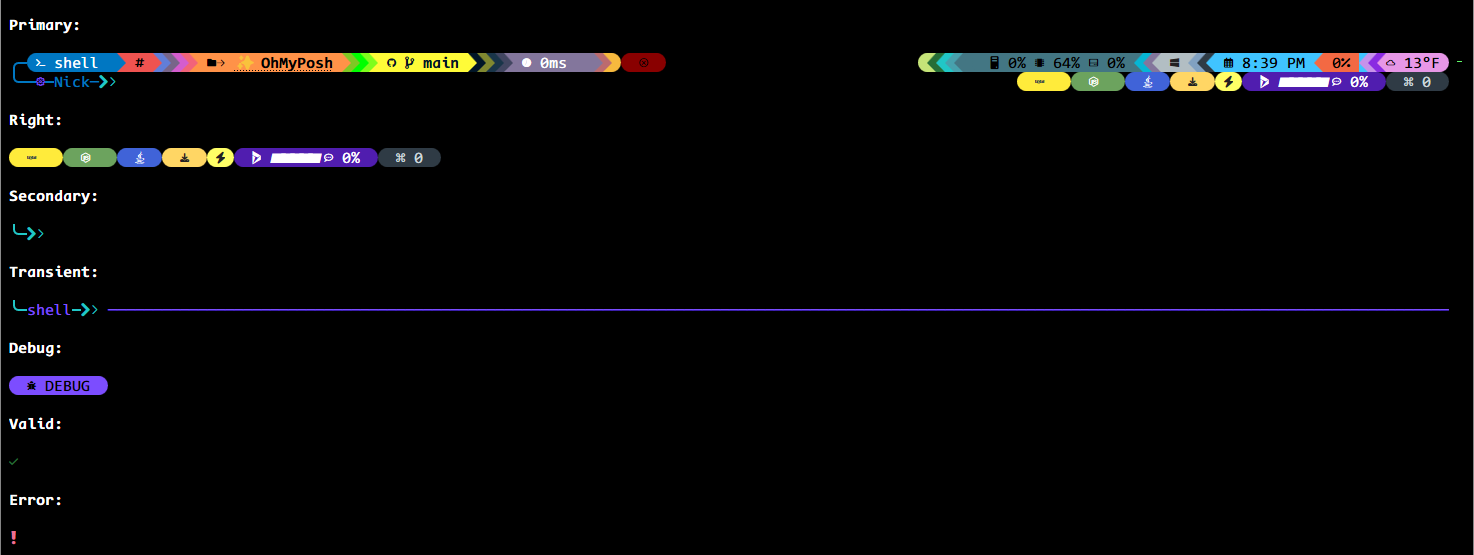
This theme is a highly customized configuration for Oh My Posh, designed to provide a visually rich, informative, and efficient prompt for your shell. It leverages advanced features of Oh My Posh, including segment styling, dynamic templates, mapped locations, and tooltips for various development environments.
🧱 Theme Structure
Docs: JSON Schema (section: Validation) · Block Config · Segment Config
- Schema: The theme uses the official Oh My Posh theme schema for validation and compatibility.
- Accent Color: Sets a primary accent color for visual consistency.
- Blocks: The prompt is divided into multiple blocks, each with its own alignment (left, right, or newline) and segments.
◀️ Left-Aligned Prompt
Relevant segments: shell · root · path · git · executiontime · status
Contains segments for:
- Shell Info 🐚: Displays shell name and version, with mapped names for common shells.
- Root Status 🔐: Highlights if running as administrator/root.
- Path 📁: Shows the current directory, with custom icons and mapped locations for quick recognition (e.g., “UW” for Uptime-Watcher repo, icons for Desktop/Documents/Downloads).
- Git 🌿: Shows branch, status, and upstream info, with color changes based on git state. Under v31, the status fields in those templates intentionally trigger collection; the existing folder cache and excluded high-churn folders limit repeated scans.
- Execution Time ⏱️: Displays how long the last command took to run.
- Status ✅/❌: Indicates success or error of the last command.
▶️ Right-Aligned Prompt (same-line; alignment: “right”)
Relevant segments: sysinfo · os · time · weather/owm · battery · node · npm · java · python · dotnet · upgrade · gitversion
Contains segments for:
- System Info 🧮: CPU, memory, and disk usage, with dynamic coloring.
- OS Info 🖥️: Shows the operating system and WSL status.
- Time 🕒: Current date and time, with customizable format.
- Weather ☀️: Displays current temperature using OpenWeatherMap (OWM), with units and timeout settings.
- Battery 🔋: Shows battery status and state, with color changes for charging/discharging/full.
- Runtime badges & package managers ⚙️: Shows runtime details for Node, Java, Python, .NET and package manager badges (npm/pnpm/yarn), useful in developer workflows.
- Upgrade & Tooling Notices ⚠️: The
upgradesegment shows whether tool or theme updates are available. - GitVersion (slimfat): In the
slimfatfamily,gitversiondisplays version metadata for project release or tagged versions.
➡️ Right Prompt (explicit rprompt block)
Relevant segments: promptcounter · upgrade · root · copilot (experimental, rprompt)
Contains segments for:
- Prompt Count #️⃣: Shows the number of prompts in the session.
- Upgrade Notice ⬆️: Indicates if Oh My Posh can be upgraded.
- Root Status ⚡: Quick root indicator.
- Copilot gauge 🤖 (experimental): Shows Copilot premium quota and percent remaining in the
rpromptblock when integration is available.
Note: Some segments may appear as ‘alignment: right’ (same-line right-aligned) or in an explicit rprompt block depending on the theme family. For example, copilot appears as an rprompt-type segment in experimentalDividers, while runtime badges (node, npm, java, python, etc.) are frequently in alignment: right blocks across families.
⤵️ Newline Block
Relevant segments: text (decorative line) · session · status
Contains segments for:
- Decorative Line ─: Visual separator for prompt clarity.
- Session Info 👤: Shows username and SSH session status.
- Status ✅/❌: Indicates command status with icons.
✨ Key Features
Docs: Templates · Mapped Locations · Caching (section removed: see General Config for related settings) · Styles & Separators (see General Config) · Tooltips
- Dynamic Templates 🧬: Many segments use Go template syntax to display context-aware information (e.g., git status, shell name, mapped locations).
- Mapped Locations 🗺️: Custom folder names/icons for frequently used paths, making navigation easier.
- Segment Styling 💎: Uses “diamond” and “powerline” styles for modern, visually appealing separators and backgrounds.
- Caching ⚡: Segments cache their data for performance, with customizable durations and strategies (e.g., session, folder).
- Tooltips 💡: Provides quick info for common tools (React, TypeScript, Node, Java, Git, etc.) when detected in the current folder.
- HTTP tooltips & enrichment 🛰️: Several tooltips use the
httpsegment to fetch metadata about packages, versions, and remote services. Common examples included in the themes:- React, TypeScript, Vite, Playwright & Vitest (fetching npm registry versions)
- Prettier, Axios, Zod and other packages used as small badges/tooltips
- IP lookups via
ipify(IPv4/IPv6) for quick network visibility - GitVersion & Git metadata via HTTP or local lookups (Slimfat) Tooltips are defined per-theme and may vary across variants.
- Status and Error Handling 🚦: Segments change color and icons based on command success, errors, or git state.
- Customization 🎯: Nearly every aspect (colors, icons, templates, widths) can be adjusted to fit your workflow and preferences.
📦 Per-Family Segment Highlights
Some segments are specific to certain theme families; the main custom families are: experimentalDividers, OhMyPosh-Atomic-Custom (atomic custom), 1_shell, slimfat, atomicBit, and cleanDetailed.
- Experimental Dividers (highlight):
copilot— An interactive Copilot gauge showing premium quota/percent (shown when a Copilot premium API or status is available) and it lives in anrpromptblock; HTTP tooltips, npm/node/java runtime badges are often right-aligned same-line segments. Experimental Dividers also include rich HTTP tooltips and IP lookups (ipify). - Atomic Custom: Common runtime badges and package checks (
node,npm,java,upgrade) used for everyday project contexts. - Slimfat: Focused on compact displays and additional project/runtime segments like
gitversion,project, and Windows-specificwinreginfo. - AtomicBit: Developer-focused segments for language and platform tooling —
angular,aurelia,aws,kubectl,nx,dart,go,julia,rust,ruby, and others; these appear mostly in this family.
If you need a segment added to README that’s used only by an official theme (not one of the custom families), let me know and I’ll add a note under “Official Families” instead.
📋 Detailed Segment Index (by family)
Below is a convenience index showing which segments are used in each family of themes. This helps contributors see at a glance which segments are available in a family and which are exclusive. ### experimentalDividers - `battery` - `connection` - `copilot` - `executiontime` - `git` - `gitversion` - `http` - `ipify` - `java` - `node` - `npm` - `os` - `owm` - `path` - `project` - `python` - `react` - `root` - `session` - `shell` - `status` - `sysinfo` - `text` - `time` - `upgrade` - `winreg` ### atomicCustom - `battery` - `connection` - `executiontime` - `git` - `gitversion` - `http` - `ipify` - `java` - `node` - `npm` - `os` - `owm` - `path` - `project` - `python` - `react` - `root` - `session` - `shell` - `status` - `sysinfo` - `text` - `time` - `upgrade` - `winreg` ### 1_shell - `battery` - `connection` - `executiontime` - `git` - `gitversion` - `http` - `ipify` - `java` - `node` - `os` - `path` - `project` - `python` - `react` - `root` - `session` - `shell` - `status` - `sysinfo` - `text` - `time` - `upgrade` - `winreg` ### slimfat - `battery` - `connection` - `dotnet` - `executiontime` - `git` - `gitversion` - `http` - `ipify` - `java` - `node` - `os` - `path` - `project` - `python` - `react` - `root` - `session` - `shell` - `status` - `sysinfo` - `text` - `time` - `upgrade` - `winreg` ### atomicBit - `angular` - `aurelia` - `aws` - `azfunc` - `battery` - `connection` - `dart` - `dotnet` - `executiontime` - `git` - `gitversion` - `go` - `http` - `ipify` - `java` - `julia` - `kubectl` - `node` - `nx` - `os` - `owm` - `path` - `project` - `python` - `react` - `root` - `ruby` - `rust` - `session` - `shell` - `status` - `sysinfo` - `text` - `time` - `upgrade` - `winreg` ### cleanDetailed - `battery` - `connection` - `executiontime` - `git` - `gitversion` - `http` - `ipify` - `java` - `node` - `os` - `path` - `project` - `python` - `react` - `root` - `session` - `shell` - `status` - `sysinfo` - `text` - `time` - `upgrade` - `winreg`📦 Oh-My-Posh Installation
Docs: Installation: Windows · macOS · Linux · Fonts · Customize
Minimum version: Oh My Posh v31.0.0 or newer is required. These themes rely on v31 template-derived language, Terraform, and SCM data fetching; the Extended helper also renders Jujutsu’s v31
.AheadCountfield.
Terraform .Version represents the project’s pinned, required, or state-recorded Terraform version, not the installed CLI version.
🛠️ How to Use
- Quick Start (from GitHub URL): You can use the theme directly from the GitHub repository without downloading it:
oh-my-posh init pwsh --config "https://raw.githubusercontent.com/Nick2bad4u/OhMyPosh-Atomic-Enhanced/main/OhMyPosh-Atomic-Custom-ExperimentalDividers.json" | Invoke-Expression
- Local Setup: Copy the theme JSON (
OhMyPosh-Atomic-Custom-ExperimentalDividers.json) to your system. Set your shell to use this theme with Oh My Posh:
oh-my-posh init pwsh --config "<path-to>/OhMyPosh-Atomic-Custom-ExperimentalDividers.json" | Invoke-Expression
- Fish (recommended variant): Fish uses a native right prompt (
fish_right_prompt). Prompts that draw right-aligned blocks inside the left prompt via cursor positioning can cause truncation/ellipsis.
Use the Fish-specific variant (right-side content is rendered via fish_right_prompt):
oh-my-posh init fish --config https://raw.githubusercontent.com/Nick2bad4u/OhMyPosh-Atomic-Enhanced/main/OhMyPosh-Atomic-Custom-ExperimentalDividers.Fish.json | source
- Generated special variants: Extended adds additional VCS segments and tooltips. ColorCycle applies the same ordered color cycle to the current Atomic Custom or ExperimentalDividers structure. Gradient and GradientRamps use native two-stop backgrounds to connect prompt segments from
parentBackgroundinto their own palette colors. GradientRampsAutoShade uses automatic dark gradients at independent block entries while retaining the connected ramps between segments. All helpers follow the repository’s Oh My Posh v31.0.0 minimum.
pwsh ./scripts/Make-ExtendedVariant.ps1
pwsh ./scripts/Make-ColorCycleVariant.ps1
pwsh ./scripts/Make-ColorCycleVariant.ps1 -Source ./OhMyPosh-Atomic-Custom-ExperimentalDividers.json
pwsh ./scripts/Make-GradientVariant.ps1
pwsh ./scripts/Make-GradientRampsVariant.ps1
pwsh ./scripts/Make-GradientRampsAutoShadeVariant.ps1
These commands generate complete standalone files at the repository root. They intentionally synchronize shared settings from their canonical source themes instead of preserving stale fields in an older generated file.
Test the generated gradient variants locally with Oh My Posh v31.0.0 or newer:
oh-my-posh init pwsh --config ./OhMyPosh-Atomic-Custom-ExperimentalDividers.Gradient.json | Invoke-Expression

# Alternative with position-matched full-block transition ramps
oh-my-posh init pwsh --config ./OhMyPosh-Atomic-Custom-ExperimentalDividers.GradientRamps.json | Invoke-Expression

# Automatic shading is limited to independent block entries
oh-my-posh init pwsh --config ./OhMyPosh-Atomic-Custom-ExperimentalDividers.GradientRampsAutoShade.json | Invoke-Expression
Oh My Posh cannot calculate gradients for interactive: true segments, so this generated test variant makes its path and Git segments non-interactive. The canonical ExperimentalDividers theme keeps their original interactive settings. Standalone tooltips remain solid because they do not have a dependable adjacent-segment color chain.
Oh My Posh calculates each gradient within an individual segment and distributes its stops across terminal character cells. The current Gradient variant removes the 30 colored one-cell transition dividers that exposed abrupt vertical bands and lets the following wider content segment interpolate directly from parentBackground. GradientRamps instead collapses those chains into nine six-cell full-block ramps. GradientRampsAutoShade keeps the same ramps and applies dark-gradient(color) only to the shell, npm right-prompt, and separate right-block entries, where no dependable parentBackground exists. Each ramp wraps its cells in <background,transparent>, so the foreground resolves to the gradient color at that text position and visually merges into the background while retaining stable terminal width. The transparent divider caps remain, and the canonical ExperimentalDividers theme keeps its complete divider layout.
Customize mapped locations, icons, and colors as needed in the JSON file.
🧪 Advanced Customization
Docs: Segment Config · Templates Guide · Palette & Colors · Tooltips
- Segment Properties: Each segment type (shell, path, git, etc.) has its own properties for fine-tuning behavior and appearance.
- Templates: Use Go template expressions to display dynamic info (see Oh My Posh docs).
- Tooltips: Add or modify tooltips for your favorite tools and languages.
For more details, see the Oh My Posh documentation.
📚 Documentation
For comprehensive guides, configuration options, and troubleshooting, refer to the official Oh My Posh documentation at https://ohmyposh.dev/docs.
Project docs:
🔐 Security & Privacy (Network Calls)
Some segments/tooltips in this repo can make outbound HTTP requests (weather, public IP lookup, package registry lookups, etc.). This repo does not store secrets; integrations are configured to read credentials from environment variables.
To disable all network calls, generate an offline variant:
pwsh ./scripts/Make-NoNetwork.ps1 -SourceTheme ./OhMyPosh-Atomic-Custom-ExperimentalDividers.json
Then use the generated *.NoNetwork.json config.
See SECURITY.md for details.
🎨 Palette & Color Groups
The theme centralizes all colors in a `palette` so segments and templates stay consistent and easy to tweak. Colors are grouped by functional intent rather than pure hue. Use `p:
AmberSunset
|
AyuMirage
|
BlueOcean
|
CatppuccinFrappe
|
CatppuccinMocha
|
CherryMint
|
ChristmasCheer
|
Cobalt2
|
ColorCycle
|
DraculaNight
|
Duskfox
|
EasterPastel
|
Everforest
|
Extended
|
FireIce
|
Fish
|
ForestEmber
|
GithubDark
|
Gradient
|
GradientRamps
|
GradientRampsAutoShade
|
GreenMatrix
|
GruvboxDark
|
HalloweenSpooky
|
KanagawaWave
|
LavenderPeach
|
MaterialPalenight
|
MidnightGold
|
MonokaiPro
|
Nightfox
|
NightOwl
|
NoNetwork
|
NordFrost
|
NoShellIntegration
|
OneDark
|
Original
|
PinkParadise
|
Poimandres
|
PurpleReign
|
RainbowBright
|
RedAlert
|
RosePine
|
SolarizedDark
|
Synthwave84
|
TealCyan
|
TokyoNight
|
ColorCycle
|
AmberSunset
|
AyuMirage
|
BlueOcean
|
CatppuccinFrappe
|
CatppuccinMocha
|
CherryMint
|
ChristmasCheer
|
Cobalt2
|
DraculaNight
|
Duskfox
|
EasterPastel
|
Everforest
|
FireIce
|
ForestEmber
|
GithubDark
|
GreenMatrix
|
GruvboxDark
|
HalloweenSpooky
|
KanagawaWave
|
LavenderPeach
|
MaterialPalenight
|
MidnightGold
|
MonokaiPro
|
Nightfox
|
NightOwl
|
NordFrost
|
OneDark
|
Original
|
PinkParadise
|
Poimandres
|
PurpleReign
|
RainbowBright
|
RedAlert
|
RosePine
|
SolarizedDark
|
Synthwave84
|
TealCyan
|
TokyoNight
|
AmberSunset
|
AyuMirage
|
BlueOcean
|
CatppuccinFrappe
|
CatppuccinMocha
|
CherryMint
|
ChristmasCheer
|
Cobalt2
|
DraculaNight
|
Duskfox
|
EasterPastel
|
Everforest
|
FireIce
|
ForestEmber
|
GithubDark
|
GreenMatrix
|
GruvboxDark
|
HalloweenSpooky
|
KanagawaWave
|
LavenderPeach
|
MaterialPalenight
|
MidnightGold
|
MonokaiPro
|
Nightfox
|
NightOwl
|
NordFrost
|
OneDark
|
Original
|
PinkParadise
|
Poimandres
|
PurpleReign
|
RainbowBright
|
RedAlert
|
RosePine
|
SolarizedDark
|
Synthwave84
|
TealCyan
|
TokyoNight
|
AmberSunset
|
AyuMirage
|
BlueOcean
|
CatppuccinFrappe
|
CatppuccinMocha
|
CherryMint
|
ChristmasCheer
|
Cobalt2
|
DraculaNight
|
Duskfox
|
EasterPastel
|
Everforest
|
FireIce
|
ForestEmber
|
GithubDark
|
GreenMatrix
|
GruvboxDark
|
HalloweenSpooky
|
KanagawaWave
|
LavenderPeach
|
MaterialPalenight
|
MidnightGold
|
MonokaiPro
|
Nightfox
|
NightOwl
|
NordFrost
|
OneDark
|
Original
|
PinkParadise
|
Poimandres
|
PurpleReign
|
RainbowBright
|
RedAlert
|
RosePine
|
SolarizedDark
|
Synthwave84
|
TealCyan
|
TokyoNight
|
AmberSunset
|
AyuMirage
|
BlueOcean
|
CatppuccinFrappe
|
CatppuccinMocha
|
CherryMint
|
ChristmasCheer
|
Cobalt2
|
DraculaNight
|
Duskfox
|
EasterPastel
|
Everforest
|
FireIce
|
ForestEmber
|
GithubDark
|
GreenMatrix
|
GruvboxDark
|
HalloweenSpooky
|
KanagawaWave
|
LavenderPeach
|
MaterialPalenight
|
MidnightGold
|
MonokaiPro
|
Nightfox
|
NightOwl
|
NordFrost
|
OneDark
|
Original
|
PinkParadise
|
Poimandres
|
PurpleReign
|
RainbowBright
|
RedAlert
|
RosePine
|
SolarizedDark
|
Synthwave84
|
TealCyan
|
TokyoNight
|
AmberSunset
|
AyuMirage
|
BlueOcean
|
CatppuccinFrappe
|
CatppuccinMocha
|
CherryMint
|
ChristmasCheer
|
Cobalt2
|
DraculaNight
|
Duskfox
|
EasterPastel
|
Everforest
|
FireIce
|
ForestEmber
|
GithubDark
|
GreenMatrix
|
GruvboxDark
|
HalloweenSpooky
|
KanagawaWave
|
LavenderPeach
|
MaterialPalenight
|
MidnightGold
|
MonokaiPro
|
Nightfox
|
NightOwl
|
NordFrost
|
OneDark
|
Original
|
PinkParadise
|
Poimandres
|
PurpleReign
|
RainbowBright
|
RedAlert
|
RosePine
|
SolarizedDark
|
Synthwave84
|
TealCyan
|
TokyoNight
|